
What is a digital project?
To set up a digital project, you first need to know what we mean by a digital project. The answer is actually quite simple. As soon as the 'end product' of your project contains an element that is digital, it is already a digital project. This ranges from basic digital services, such as a website or CRM system, to innovative applications like a digital exhibition or app.
In this 'longread,' we cover all the steps involved in a digital project within the basic services. By this, we mean the recurring, structural services that are part of the core of your organization, such as implementing existing internal systems or renewing existing digital tools.
This means that a digital project could involve a new software system, online document management, a collaboration environment, a new (corporate) website, or an administrative system (planning system, accounting system, etc.).
For a digital project as part of your basic services, you can clearly define in advance the desired outcome and the impact the project will have on the organization.
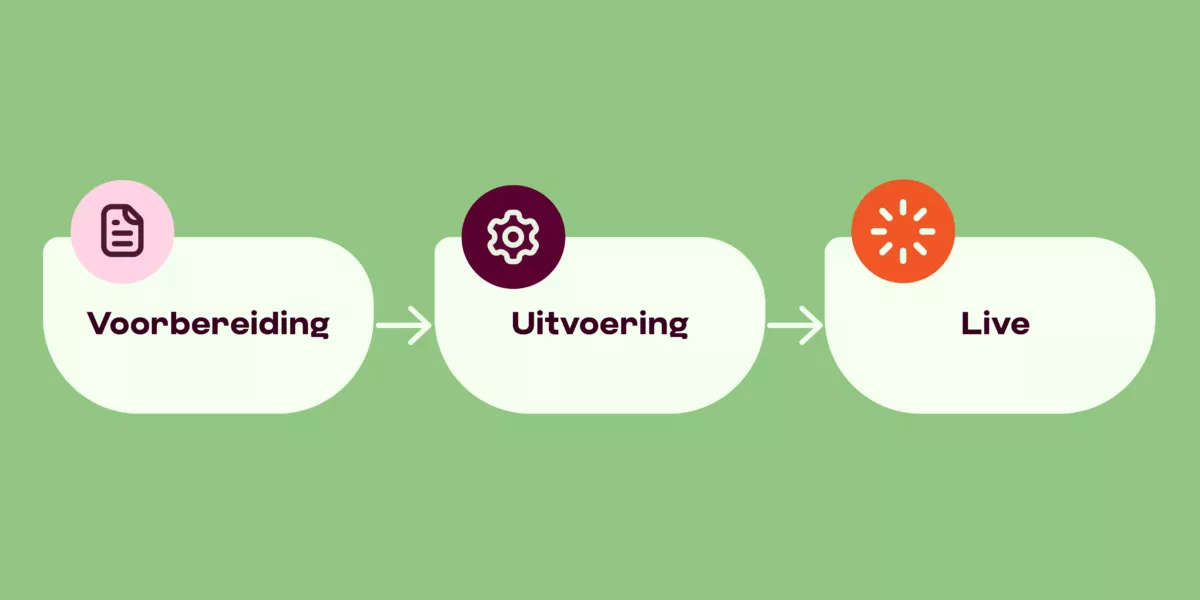
Setting up a digital project for your basic services
To successfully approach a digital project, you need to go through three standard phases: preparation, execution, and follow-up.
The preparation phase includes clearly articulating the "why" and setting up a project canvas. You can see this as a compact visual representation of a project, where you quickly and clearly structure important elements. This is useful for brainstorming, discussing, and planning your digital project. A project canvas can help you think about the questions you need to answer before starting your digital project.
1. Preparation
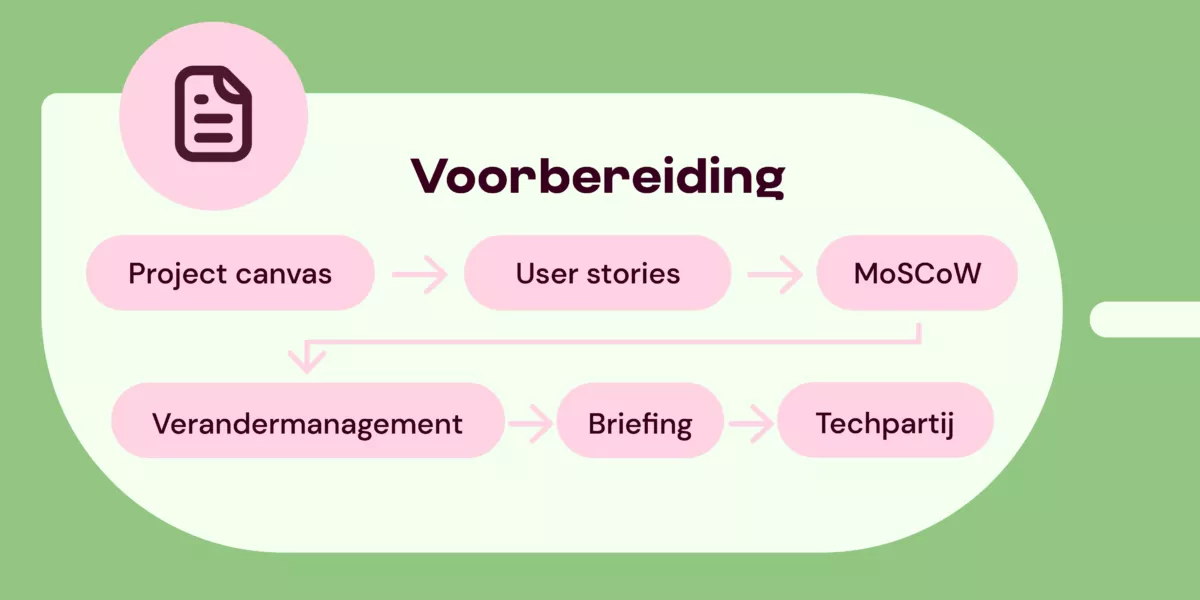
Go directly to Execution and Live
a. The project canvas as a tool for a digital project
Such a project canvas is a tool and a precursor to the briefing you ultimately communicate to a technical partner. It's a kind of preliminary research. In a project canvas, you answer questions like: why do you want this digital project, what problems are you solving with the digital project, and who is the digital project intended for? With DEN’s project canvas template and step-by-step plan, you can systematically map out these questions and their answers. This gives you a clear starting point for a digital project.
In the article 'Project canvas: a good start for your digital project' we dive deeper into the theory of the project canvas.
b. How can user stories help me?
In a project canvas, you often work with user stories. A user story is literally a story about a user. It’s a brief description of a user’s need in the form of a short narrative. User stories help you visualize in advance what exactly you are solving for whom and why with your digital project. Use our template for user stories within a digital project.
In the article 'User stories explained: who are the users of a digital project?' we delve further into the theory surrounding user stories.
c. How do I determine what’s important in my digital project?
The MoSCoW method
While creating your project canvas and working with user stories, you’ll need to prioritize: what is important and what is not? To prioritize effectively within a digital project, you need to list: which elements are nice to have but not essential? What is desirable but lower on the priority list? And what do we (consciously) leave aside for now?
There’s a simple method to distinguish all these things: the MoSCoW method. With this, you differentiate Must have (mandatory), Should have (should ideally), Could have (nice but not necessarily now), and Won’t have (we’ll leave it for now). Here’s the difference between the four.
Must have
The Must-have list contains the elements crucial for starting the project. For example, hardware or privacy-assuring software.
Should have
The wish list contains items you want to deliver in the medium to long term. These items are not yet necessary for the first phase of the project (in the short term). For example, using a Large Language Model trained only with your own data.
Could have
A list of Could haves essentially says: this is nice to have, but maybe something for later. For example, a new CRM system that can ‘communicate’ with the CMS.
Won’t have
This one is clear: not needed (for now). By distinguishing these four, you have priorities in view and know what must and what can. This list also helps you during a concrete conversation later with your future technical partner.
d. Change management: how do you involve users in a digital project?
One way to make change easier and more successful is the Prosci method*, a well-known change management method. We guide you step by step through the Prosci method for change management.
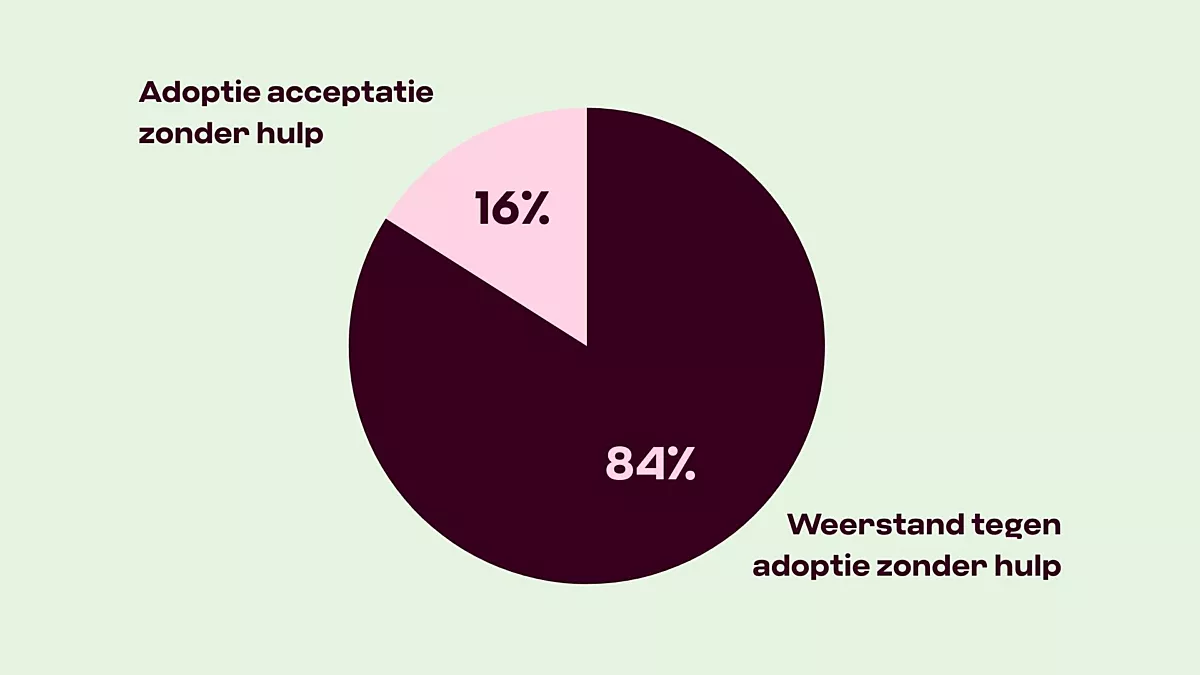
Implementing a new system takes quite some effort. You can build it, but it also needs to be used effectively. How do you ensure that? And how do you reduce or prevent resistance in a digital project? Change management can help. Change management is the point where you actively involve everyone affected by the digital trajectory in some way. We guide you step by step through the Prosci method for change management so that your digital project is well-received by all your users.
*Prosci is a globally leading methodology for change management, focused on the human side of change. It uses the well-known ADKAR model (Awareness, Desire, Knowledge, Ability, Reinforcement) to guide individuals and organizations through transformations.
In the article Implementing digital projects: dealing with change, we explain what change management entails and how you can practically apply the Prosci method and the ADKAR model.
e. How do you write a good briefing?
For almost all digital projects, you’ll need an external party. A project canvas is usually too concise for a discussion — it’s more of a strategic summary. Therefore, it’s important to prepare a clear briefing before you start looking for a tech partner. In it, you specify your expectations, estimate the budget, mention a rough deadline, and indicate who needs to be involved internally.
In the article 'How to write a good briefing for your digital project' we detail what a good briefing should include.
f. How do I choose the right technical partner for my digital project?
Which technical agency would suit your digital project? Ask yourself the following questions during orientation: is this company familiar with your sector, and have they developed a similar product before? Does their way of working fit your organization? Does their project setup align with yours? Does a large or small agency suit you?
You can, of course, work with an agency you already know, but it’s also worth meeting new contenders or writing a pitch.
Learn how to choose the best technical partner for a digital project in the article 'How to choose a tech partner for your digital project'.
You’ve chosen your tech partner, now what?
You’ve selected your agency. Now what? Usually, the first step is to decide whether to go for an existing solution (possibly with adjustments) or a new product. The methodology is often determined by the agency you’re collaborating with.
They have experience building the product and can determine whether it works well in the context you intend to use it. Together with your tech partner, you’ll ultimately decide on: final methodologies, budget, planning, and the project team.
- The phases of an existing solution
If you choose an existing solution on the market, you can often agree on a pilot with your technical supplier. This is a kind of trial period. You don’t have to buy the solution immediately or acquire a long-term license, but you use the software for, say, three months as a trial. Afterward, you can often tweak and customize to achieve the optimal result.
- The phases of a new digital product
Are you building a new digital product? Then you generally go through four phases: exploration, development, testing, and implementation. But there’s a fifth! Adjusting and updating. This is sometimes forgotten but is an integral part of your digital product.
For each phase, it’s important to schedule measurement points and decision moments. You can document this in a work plan or roadmap.
2. Execution
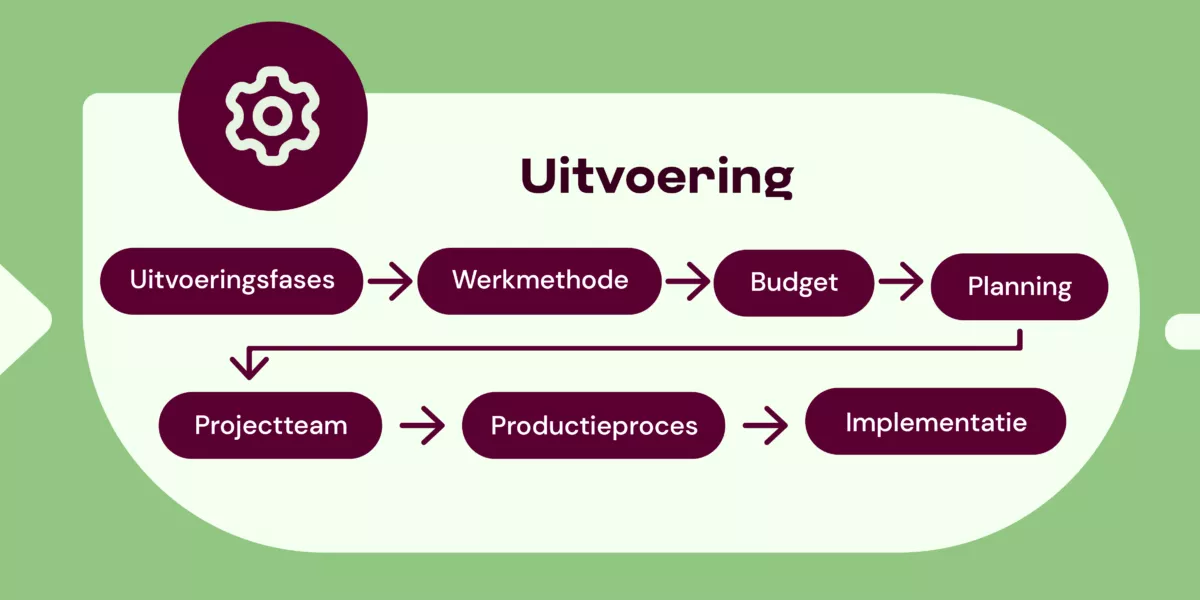
You’ve chosen the right technical partner, sharpened the briefing, and completed the preparation — time to really get started. In the execution phase, everything comes together: plans become tangible steps, ideas are built, and your collaboration takes shape. Together with your tech partner, you define not only what is being built but also how you’ll work, with which team, budget, and timeline. In the following sections, we guide you step by step through this process so you can make clear choices and maintain control over what happens along the way.
a. What are the phases of executing a digital project?
Exploration
Hide explanationShow explanation
Exploration
In the exploration phase, you gather information, map out the target audience and requirements, refine the problem definition, and explore possible solutions. Much of this has already been done in the project canvas and briefing, so exploring possible solutions is most relevant.
Ways to do this include: research, interviews, brainstorming, analyzing existing solutions.
Development
Hide explanationShow explanation
Development
During this phase, concepts are developed and initial versions are built. Together with the tech partner, you review functionalities and structure. Ways to do this include: creating wireframes, drafting technical designs, building prototypes.
Testing
Hide explanationShow explanation
Testing
During the testing phase, you gather feedback from your future users. You identify problems and areas for improvement and validate assumptions. Ways to do this include: user tests, A/B tests, feedback sessions, technical tests.
Implementation
Hide explanationShow explanation
Implementation
During this phase, you actually start using the product. People are trained to use it. Note: this may seem like the final phase, but you’ll often deal with tweaks (adjustments) and bugs (‘errors’) afterward. Ways to do this include: launching the software, providing manuals and training, conducting iterations and interventions, offering support.
Adjusting and updating
Hide explanationShow explanation
Adjusting and updating
When you’re done, you’re not done. You’ll always find that things need to be changed because needs evolve or technology changes. Built systems also need regular updates, better functionalities, and maintenance. Include this in your budget.
b. Determine your work methodology
As you continue with your digital project, you need to decide how you want to work. There are different project methodologies for your digital project. For example, you can work with the waterfall method, agile/scrum, or hybrid.
What are the different project methodologies (and what is scrum)?
Waterfall
Hide explanationShow explanation
Waterfall
With the Waterfall method, several phases are completed one by one (linearly). That is, step by step, in one direction. Hence the name Waterfall method; because a waterfall flows downward. This means that each phase thoroughly and exhaustively inventories and elaborates all requirements. Only then can you move on to the next step. This also means that the product is only available at the end, when it’s completely finished, and never as partial products.
In a static world, this works excellently. The Waterfall method is best used in environments that change little or not at all: you determine your goal very well at the beginning and then work towards it very purposefully and efficiently. But often, in the (digital) practice, this doesn’t work.
With the Waterfall method, you have to make targeted estimates at the beginning of the project. In a changing environment, this method carries the risk that the original scope no longer matches; market, customers, wishes, etc., can change while you were developing.
Iterative / agile
Hide explanationShow explanation
Iterative / agile
Very simply put, you often find during a digital project that things need to be done differently. This matches ‘iterative working’: constantly checking if something needs to be changed or improved.
Iterative, or agile (in English) working, emerged from the need to better and faster respond to the changing market and changing needs and wishes. Agile literally means agility, flexibility. If you work from the agile methodology, you’re aware that circumstances change. The methodology makes room for this and encourages testing partial solutions. No big master plan that is executed step by step, but smaller projects that build towards a big goal of which you only agreed on the outlines at the start. In iterative/agile, you often work in small ‘sprints’ or rounds; this is called the scrum method.
In agile working, several aspects are central:
- The world around us changes, so environmental factors that affect our product also change
- The wishes of stakeholders will change during a project’s duration
- To respond well to changes, you continuously check if the work you’re doing for the upcoming period is still the most valuable work
- To check often, you also release (partial) products more frequently
- During development, work is tested, validated, and reviewed to see what works and what doesn’t; new insights gained are immediately incorporated.
Hybrid
Hide explanationShow explanation
Hybrid
Hybrid is a mix of more traditional forms like waterfall combined with agile: both a fixed linear process and ‘moving parts’ and short spurts.
In our experience, most digital projects in the cultural sector benefit from a hybrid work methodology. Some things can be predicted and provide structure, while other elements focus on flexibility and incorporating new insights. This way, you can remain ‘flexible’ during the project while also working realistically within the organizational structures often present in cultural organizations.
Source: Agile VS Waterfall
What is scrum
Hide explanationShow explanation
What is scrum
Within agile and hybrid working, the scrum method is often used.
Simply put, scrum is:
- Make a list of what needs to be built
- Decide what you’ll do this period (the sprint)
- Meet daily and collaborate
- Show what you’ve made at the end
- Think about how it can be better for the next scrum round
- And start again at point 1
Source: Agile VS Waterfall
What if my external supplier wants agile/scrum, but my organization is used to traditional planning?
Discuss with your supplier what the possibilities and limitations are for your organization. Get informed about the expectations the supplier has of you in an agile/scrum project. Experience shows that a mixed form often works very well, so waterfall in your organization and scrum at the design company can work fine, as long as the process is discussed in advance and expectations are clear on both sides. Make sure to document this to avoid misunderstandings.
c. How do I determine the budget for my digital project?
The next step is the final budget determination. How much does a digital project cost? It often helps to reverse the question and ensure your request isn’t endlessly large and complex. The question then becomes: how big is this digital project for your organization, how much budget and team time can you allocate for it? With this question in hand, it becomes much easier to arrive at a budget because it makes the question more concrete and starts from the available resources.
Step-by-step plan to determine your budget
What is essential and what is optional for your digital project?
Hide explanationShow explanation
What is essential and what is optional for your digital project?
We already discussed the MoSCoW method: Must have, Should have, Could have, Won’t have (for now). When drafting your budget for the project, the Must-haves (essential) and Should haves (you should have them) are, of course, leading. These are placed at the top. The Could haves (nice, but not essential) depend on both budget and priority. The Won’t haves are something that is not a priority now and will be left aside. These are important ingredients to determine the minimum required for your digital project (MVP: minimal viable product). But what else needs to be determined?
What should you discuss with your external agency for the required budget?
Hide explanationShow explanation
What should you discuss with your external agency for the required budget?
The budget determination then depends on the following important aspects:
- Core functionalities
- Design needs
- Platforms
- Integrations (system connections)
- Is content creation needed? (and who does that: internally or externally?)
- Development and maintenance
Additionally, there are some questions to discuss with your technical partner/external agency:
- Are we working with a fixed price? Or do we determine it per step?
- Which roles need to be fulfilled (explained in the chapter: Assemble your project team), what are the required hours, and what are the costs? (note: internal hours should also be calculated, and external hours are often costly)
- Are we going for customization (and to what extent) or not?
- Are there licenses that need to be paid?
- What are the costs for hosting, support, updates, development after launch? (and other long-term costs?)
NOTE: there are always unforeseen costs. These usually range between 10% and 30%. A realistic estimate is usually 20% on top of the total budget.
How much budget for maintenance and development?
Hide explanationShow explanation
How much budget for maintenance and development?
Besides the budget for developing your digital project, it’s also important to allocate budget for maintenance and development. This is sometimes forgotten — projects are often seen as final products, while they are only partially so, because the world doesn’t stand still. The final product is therefore not the final product.
For successful development of your project, it’s important to allocate sufficient time and budget for technical maintenance and new insights.
Often, this is higher than you might initially expect; discuss this with your technical partner early on.
A good rule of thumb is to reserve at least 20% of the initial budget to spend annually on development in the following years. For example, with a project budget of 25,000 euros, this means an annual budget of 5,000 euros. The exact amount strongly depends on the products you’ve set up and the knowledge you hire and already have in-house. It’s especially important to agree on what your team can do itself and what you need the technical partner for; this has a significant impact on the budget.
How do you finalize the budget for your digital project, is there a formula?
Hide explanationShow explanation
How do you finalize the budget for your digital project, is there a formula?
The calculation you ultimately get based on all input:
Hours per role x hourly rate.
License and/or tool costs
=
Budget
+
Risk/buffer (20% of budget)
Development and maintenance (20% of budget)
=
Total budget for developing the digital project
NOTE: development and maintenance are calculated for one year with this formula. Each year, the 20% of the original budget amount you initially calculated is added again!
d. Planning
What does a planning look like? In a digital project, three components influence each other in terms of planning:
- Time (the amount of time available/can be allocated)
- Scope (what you’re creating)
- Resources (technology, people)
This is called the scope triangle.
If you change one of the three, it almost always impacts the other two. Ideally, time, scope, and resources are always balanced. In practice, one or two often dominate. Be aware that there are one or two such focal points in your project that impact your planning.
Learn how to create a planning in the article 'Creating a digital project planning step by step', which also includes a handy template.
e. Assemble your project team
How do you assemble a project team for your digital project? Digital projects almost always involve a project team that operates both within and outside the organization. We explain how to determine who you need inside and outside the organization. In any case, the roles of product owner, UX/UI designer, developer, content specialist, and tester must always be represented.
What roles exist within a digital project?
Product owner
Hide explanationShow explanation
Product owner
Determines the direction and priorities within the project and monitors the goals and content. Internal or external: preferably internal, sometimes both.
Scrum master
Hide explanationShow explanation
Scrum master
Ensures that the process runs smoothly in agile projects and removes any obstacles during the process. Internal or external: can be both, but is usually external, depending on the agreements made.
UX/UI designer
Hide explanationShow explanation
UX/UI designer
Designs the digital product and is responsible for the visual design. Internal or external: usually external.
Developer
Hide explanationShow explanation
Developer
Builds the technical solution. Internal or external: external.
Content specialist
Hide explanationShow explanation
Content specialist
Provides text and images (sometimes these roles are divided or there’s a coordinator managing this). Internal or external: usually internal, but it must be reviewed internally.
Tester(s)
Hide explanationShow explanation
Tester(s)
Checks the functionalities, quality, and usability of the digital product. Internal or external: both, often in small internal teams.
TIP: We’ve compiled some roles in an agile digital project for you in an article. If you’re working with a technical partner, it’s helpful to know these terms in advance.
3. Live
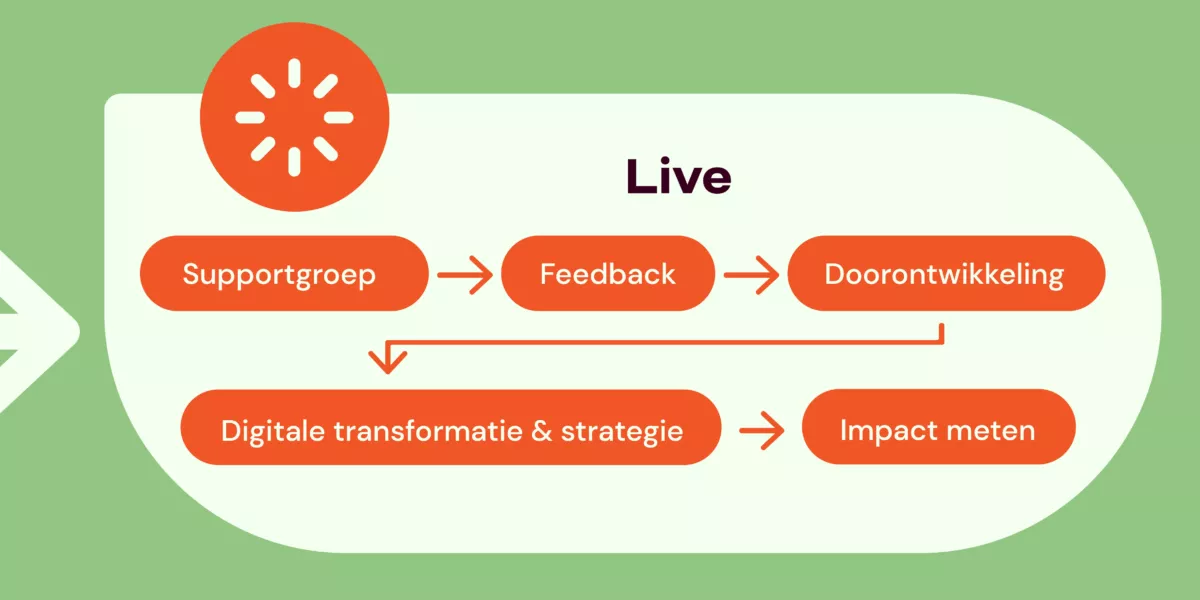
Your digital project has been built, tested, and users can start working with it. The first thing you do after your digital project goes live? Celebrate successes! Reflect on what has been achieved and what positive changes are coming.
You now have a beautiful new system that will help you further in the process of digital transformation. It’s important not to see the end of the execution period as the final destination. There are several steps you can (and should) take.
Organize your organization well to manage and optimize systems. Technical management, an innovation working group, and knowledge building are important.
a. Set up a support system for users
Once your digital project is live, it’s important that colleagues know where to go with questions. Not only for technical support but also for the new way of working. Ensure a clear point of contact or team to answer such questions. Think of: internal colleagues for functional questions and an external helpdesk for technical questions. The key is that people know who to turn to with which question. IT systems can support this but are just tools; the core is a clear organizational structure for support.
TIP: Set up an online FAQ (frequently asked questions) list where answers are provided to common questions and it’s clear who to contact for further assistance.
b. Collect user feedback after going live
There are different ways to collect user feedback. Choose what fits your organization and the size of the group you want feedback from.
A small group?
The smaller the group, the better it is to do this verbally in a meeting. Prepare your questions in advance. To ensure everyone has a chance to speak, you can use a mentimeter (www.mentimeter.com).
A large group?
If the group is large, you can use an online survey and/or deploy key-users or ambassadors: these are designated colleagues who gather feedback from others.
c. Further development, management, and optimization
A digital project is really never finished. You need to not only maintain a project technically (comparison: your phone also regularly needs updates), but you also need to make room for further development. Needs and possibilities will change.
Which three aspects should you keep in mind for management and optimization?
I. Technical management
Hide explanationShow explanation
I. Technical management
Technical management is about the daily functioning of your digital product. Things like monitoring, performance tracking, security updates, and bug fixing. If there is good technical management of your digital product, it will remain stable, secure, and reliable. It is a necessary part of progress. Technical management can be handled internally if the right knowledge is available. You can also outsource it to the supplier, in which case you make good agreements for a longer period. Either way, you will always need to manage, maintain, and adapt the system technically.
II. Innovation working group
Hide explanationShow explanation
II. Innovation working group
An innovation working group focuses on future developments. It identifies opportunities, gathers ideas, and assesses whether new functionalities are interesting. This group also experiments to investigate whether technological developments can contribute to changing user needs. An innovation working group can be internal or external, but the most successful form is usually hybrid: a combination of both.
III. Knowledge building
Hide explanationShow explanation
III. Knowledge building
Knowledge building ensures that information about the product is sustainably recorded and shared, so it does not become fragmented. Think of documentation, training materials, best practices, and lessons learned. This prevents important knowledge from being concentrated among a small number of people and makes teams more agile and onboarding easier. This knowledge is built both externally and internally, but make sure it is shared and preserved internally at least.
d. A digital project as part of digital transformation and digital strategy
Your digital project is now live — great work! But this is, of course, not the end of your cultural organization's digital journey. Digital projects contribute to a larger, continuous process: digital transformation. Digital transformation is a change process in which you continuously make choices, learn, and adjust.
Digital transformation means a vision in which digital projects fit into a broader digital strategy. A good digital strategy has concrete goals that contribute to change that is valuable for both the audience and the organization. With a good digital strategy, your cultural organization is resilient and future-proof in a continuously changing digital landscape.
Want to learn more about digital transformation? In an overview, we tell you everything about digital transformation in culture.
e. How do I measure the impact of my digital project?
It’s logical to wonder what the impact of digital activities is; how it contributes to social, educational, or artistic goals. This is also part of your digital strategy. You define the impact goals for your project or organization in advance.
Next, you determine which (digital) activities contribute to these goals. You measure this impact by testing your assumptions after implementing the new systems. Collect data about your audience, both qualitative and quantitative. For example, age categories and people's reactions to their experiences. This will give you insight into what really works in practice. Based on these insights, you can substantiate strategic choices, adjust, and allocate resources more effectively in the future.
Note! See this longread as an MVP (a first, working version): very usable, but not yet ‘finished’. We will continue to develop this material and would love to hear your feedback via communicatie@den.nl.
Start with your digital project
Want to get started with your digital project? Download all templates that help you set up a digital project.
This article is a complete overview of the approach to a digital project with the following phases:
Preparation
a. Project canvas
b. User stories
c. MoSCoW
d. Change management
e. Briefing
f. Tech partner
Execution
a. Execution phase
b. Working method
c. Budget
d. Planning
e. Project team
f. Production process
g. Implementation
Live
a. Support group
b. Feedback
c. Further development
d. Digital transformation and strategy
e. Measuring impact
Note! See this longread as an MVP (a first, working version): very usable, but not yet ‘finished’. We will continue to develop this material and would love to hear your feedback via communicatie@den.nl.


More articles per topic